

Quick answer: A transceiver fitting into a port does not prove it will operate there. SFP compatibility depends on the exact switch, uplink module, software, supported speed, transceiver identity, and the connection at the other end. Check the platform compatibility matrix before ordering optics or direct-attach cables.
A project may specify "fiber uplinks" early, then discover that the installed switches and ordered transceivers do not support the same operating speed. The connector looks right, so the mismatch is not always obvious during receiving inspection.
This guide explains the checks behind SFP compatibility for 1G, 10G, and 25G links. It focuses on procurement and acceptance testing rather than treating a shared form factor as a universal adapter.

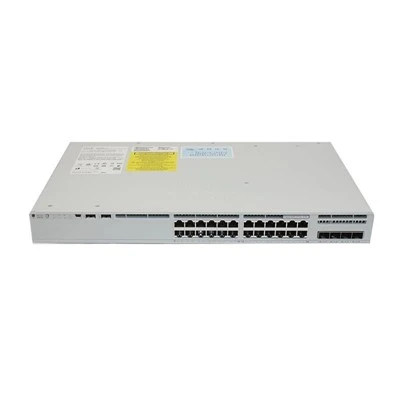
Product reference: hkaiti.com. Image illustrates equipment or material context, not a test result.
What SFP compatibility depends on
These names identify related compact transceiver formats commonly associated with 1G, 10G, and 25G Ethernet applications. The format does not independently specify the wavelength, reach, fiber type, connector, or every operating mode of the host port.
Some higher-speed ports support selected lower-speed modules; others do not, or support them only under specific configurations. A 25G cage cannot be assumed to run every 10G or 1G optic. Likewise, a 1G host does not become a 10G interface because an SFP+ module can physically enter it.
Cisco's Optics-to-Device Compatibility Matrix is the appropriate primary reference for Cisco combinations. Look up the exact device and optic, then review software requirements and any platform notes instead of transferring support from a similar-looking chassis.
Technical references: Cisco: Optics-to-Device Compatibility Matrix. Use the applicable project requirements and current product instructions.
Checks before approving SFP compatibility
Identify the actual uplink hardware
Write down the complete switch identifier and any removable network module. Access-port count and uplink capability are different specifications, so "48-port switch" does not describe the fiber interface adequately.
For modular configurations, verify the installed module rather than the optional module shown in a brochure. Include both endpoints in the SFP compatibility check; a supported transceiver on one side cannot compensate for an unsupported interface on the other.
Match the intended line rate and media
Choose a common supported operating speed, then match the optical path. Check wavelength, multimode or single-mode fiber, distance, connector polish where relevant, and the link budget required by the specific optics.
For bidirectional optics, the two ends need the correct paired wavelengths. A matching connector and similar reach label are insufficient. For DAC or AOC assemblies, check the assembly's supported hosts, speed, length, and cable type.
Check software and configuration constraints
Read the minimum software and configuration notes for the exact combination. Where forward error correction or port grouping settings apply, make sure both sides use a supported arrangement; do not copy a setting from an unrelated platform.
Keep this record with the purchase order. If the switch software changes before commissioning, review SFP compatibility again rather than assuming that an old approval automatically covers the new installation.
Common SFP compatibility mistakes
Ordering by cage shape. Mechanical fit is only an early check. Unsupported speed or host behavior can prevent link establishment even when the transceiver appears to seat normally.
Using distance as the only optical specification. Two modules advertised for similar distances may use different fibers, wavelengths, or connector arrangements. Confirm the full optical specification.
Treating a link light as acceptance. A link can establish while errors accumulate under traffic. Test the connection at the intended speed and inspect error counters before signing off.
Practical comparison of module families
| Family | Common Ethernet association | Question that still needs checking |
|---|---|---|
| SFP | 1G | Does this host support this exact module? |
| SFP+ | 10G | Does the port and software support the selected optic or cable? |
| SFP28 | 25G | Are speed, FEC, media, and host requirements aligned? |
| Lower-speed module in faster cage | Platform dependent | Is this specific lower-speed mode documented? |
This comparison describes common usage, not guaranteed backward compatibility. SFP compatibility should be established from the supported combination and verified on the actual equipment supplied.
Application scenarios and an acceptance sequence
Suppose a distribution switch has 25G-capable interfaces while an access switch has 10G uplinks. The purchasing task is to find a documented common mode and matching connection, not simply to order two 25G modules.
Review the actual uplink options for the Catalyst C9300-48P access switch configuration before selecting transceivers. If no common supported mode exists, change the interface hardware or network design instead of relying on an undocumented combination.
At receiving inspection, photograph module labels and record their part numbers, serial numbers, and supplier traceability. At commissioning, record host software, negotiated speed, optical diagnostics where supported, and error-counter changes during a controlled traffic test.
For an intermittent link, inspect and clean optical connections using the approved procedure before swapping multiple modules. Compare one known-good assembly at a time and keep the fault history; indiscriminate substitutions can hide the original combination that failed.
Put both endpoints on the optics approval sheet
An optics order should have one line for each connection, not two independent module descriptions. The record should make the common operating mode explicit and show why the two ends are intended to work together.
| Approval field | Example of the information required |
|---|---|
| Host at each end | Exact switch and installed uplink module identity |
| Supported operating mode | Intended line rate and relevant platform conditions |
| Complete connection | Optic pair or identified DAC/AOC assembly |
| Optical path where applicable | Fiber type, length, connector arrangement, and loss assessment |
| Qualification evidence | Compatibility reference and representative link test |
Consider a warehouse access switch being connected to a faster aggregation platform. If the access endpoint supports only the planned 10G mode, purchasing a 25G optic for that endpoint does not create a faster compatible link. First establish the documented common mode; then choose the connection for that mode.
If a supplier proposes a substitute assembly, compare it against both hosts and the actual installed path. Similar reach, color, or connector shape is not a complete technical equivalence statement. Ask what part of the approved connection changes and what evidence supports the revised combination.
For handover, record optical diagnostics when supported, initial error counters, and the results after the agreed traffic exercise. Keep the original part labels with the test file. This allows a later maintenance team to distinguish the qualified connection from a replacement that happened to fit the same cage.
Frequently Asked Questions
Can an SFP module work in an SFP+ port?
Sometimes. The host must explicitly support the selected 1G module and operating mode. Check the actual platform documentation rather than assuming that all SFP+ ports offer the same lower-speed support.
Can an SFP+ module run at 25G?
A 10G SFP+ module does not gain a 25G rating from its host cage. Use a documented transceiver and host combination for the intended line rate.
Does the same connector mean two optics will match?
No. Confirm wavelength, fiber type, transmit and receive specifications, distance, and any paired-optic requirements. The connector describes only one part of the link.
Are DAC cables interchangeable across switches?
Not automatically. Verify the complete cable assembly against both hosts, including supported speed, length, electrical type, and platform restrictions.
What evidence should a supplier provide?
Request exact part numbers and the compatibility reference for both endpoints, together with a test record identifying host hardware and software. A generic "compatible with Cisco" statement is too broad.
Should I force speed when a link stays down?
Only use settings documented for the combination. First check the modules, host support, cable path, and remote endpoint; unsupported configuration changes can complicate the diagnosis.
Conclusion
SFP compatibility is a property of the entire connection, not the cage alone. Confirm both hosts, media, software, and operating mode, then validate under traffic; the Catalyst C9300-48P access switch product page can help identify the equipment context for that check.